Deployment Profiles
Choose the right profile for your infrastructure
Siovos offers 6 pre-configured profiles to simplify deployment. Each profile is tailored to a specific use case and license level.
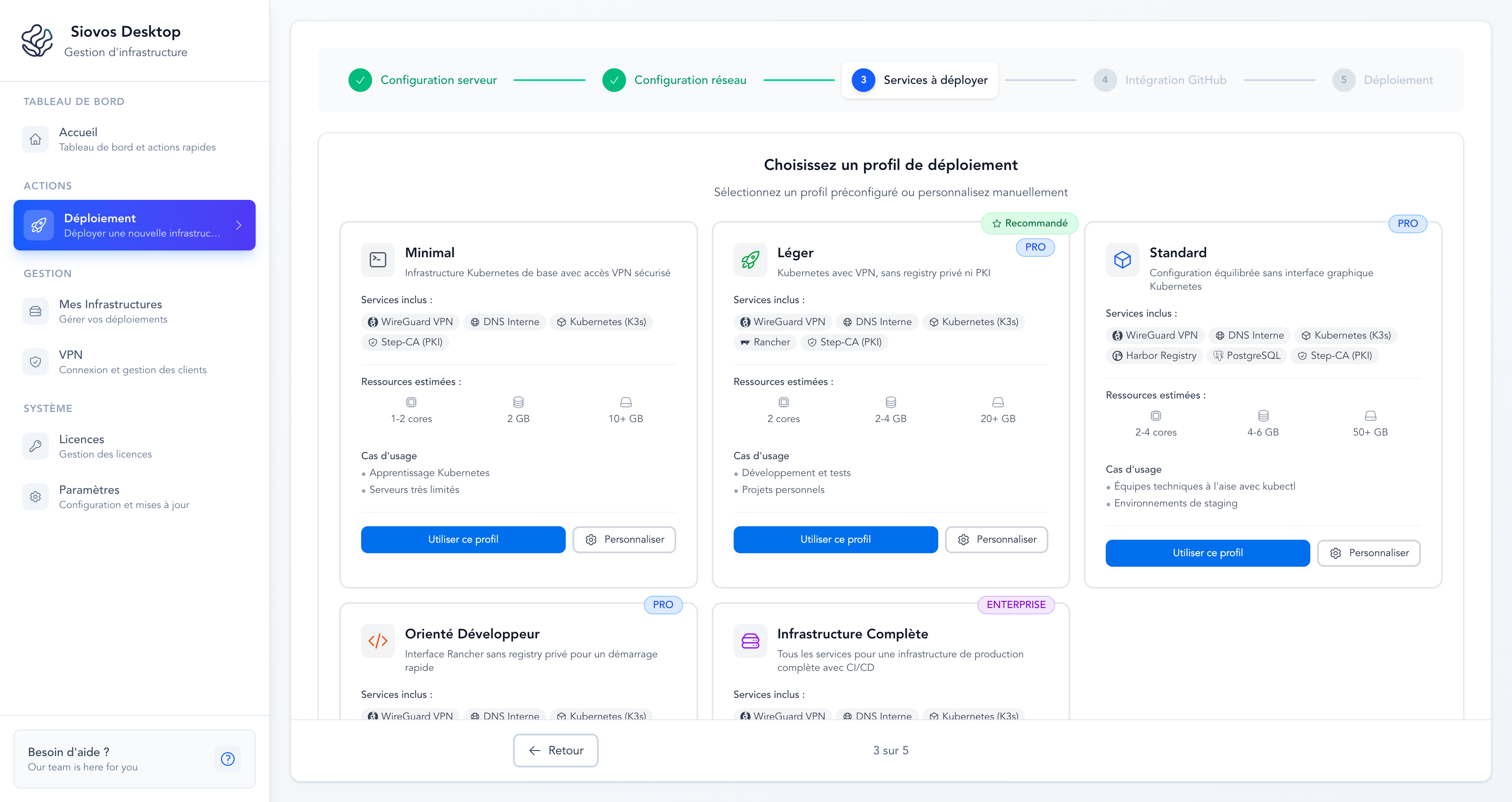
Overview#
| Profile | Required Plan | Recommended RAM | Includes |
|---|---|---|---|
| Free | Free | 1 GB | Basic Kubernetes |
| Minimal | Solo | 2 GB | + VPN, DNS, SSL certificates |
| Light | Team | 2-4 GB | + Rancher |
| Standard | Team | 4-6 GB | + Docker Registry, PostgreSQL |
| Developer-Oriented | Team | 3-4 GB | + Rancher, Mailpit |
| Complete Infrastructure | Business | 8+ GB | All services |
Base services (VPN, private DNS, SSL certificates) are included in all paid profiles.
Free#
Discover Siovos without a license. Deploys a basic Kubernetes cluster with a demo application (Podinfo).
Use case: Test Siovos before purchasing a license.
Resources: 1 GB RAM, 5 GB storage, 1 CPU core.
The Free profile does not include VPN, private DNS, or SSL certificates. Services are accessible directly via the server IP.
Minimal#
The bare minimum for a private, secure infrastructure.
Included services:
- Kubernetes
- Secure VPN
- Private DNS
- Automatic SSL certificates
Use cases:
- Testing and experimentation
- Small personal projects
- Full command-line management
Resources: 2 GB RAM, 10 GB storage, 1-2 CPU cores.
Light#
Minimal infrastructure with a web management interface. Recommended profile to get started.
Included services:
- Everything in Minimal
- Rancher (web interface to manage the cluster)
Use cases:
- Development and testing
- Personal projects
- POC and demonstrations
Resources: 2-4 GB RAM, 20 GB storage, 2 CPU cores.
Standard#
Balanced configuration with private Docker registry and database, without a Kubernetes graphical interface.
Included services:
- Everything in Minimal
- Private Docker registry (Harbor)
- PostgreSQL
Use cases:
- Technical teams comfortable with the command line
- Staging environments
- Projects with private Docker images
Resources: 4-6 GB RAM, 50 GB storage, 2-4 CPU cores.
Option: You can enable a separate development PostgreSQL instance when customizing the profile.
Developer-Oriented#
Rancher interface and email capture for a complete development workflow.
Included services:
- Everything in Minimal
- Rancher (web interface)
- Mailpit (capture and view test emails)
Use cases:
- Solo developers
- Development environments
- Rapid web application prototyping
Resources: 3-4 GB RAM, 20 GB storage, 2 CPU cores.
Complete Infrastructure#
All available services for a production infrastructure.
Included services:
- Kubernetes, VPN, DNS, SSL certificates
- Rancher (web interface)
- Private Docker registry (Harbor)
- PostgreSQL
- Mailpit (email capture)
Use cases:
- Production with full CI/CD
- Development teams
- Multi-project with private registry
Resources: 8+ GB RAM, 100 GB storage, 4+ CPU cores.
Option: You can enable a separate development PostgreSQL instance when customizing the profile.
Customize Passwords#
Before applying a profile, you can customize passwords:
- Select a profile
- Click Customize instead of Use this profile
- Modify passwords for each service
- Click Continue with this profile
You can also click the refresh icon to generate random passwords.
Add Services Later#
You're not limited to the initial profile. After deployment, you can add additional services from the Services tab of your infrastructure in Siovos Desktop.
Which Profile to Choose?#
- Just want to try Siovos? → Free
- Getting started with a small server? → Minimal
- Want a web UI for the cluster? → Light
- Need a private Docker registry? → Standard
- Building apps that send emails? → Developer-Oriented
- Want everything from the start? → Complete Infrastructure
When in doubt, go with Light. You can add services later.
Custom Service Selection (Business)#
Users with a Business license have access to manual service selection:
- On the profile selection screen, click "Manual Configuration"
- An interface with cards for each service appears
- Toggle services on or off individually
- Dependencies are handled automatically
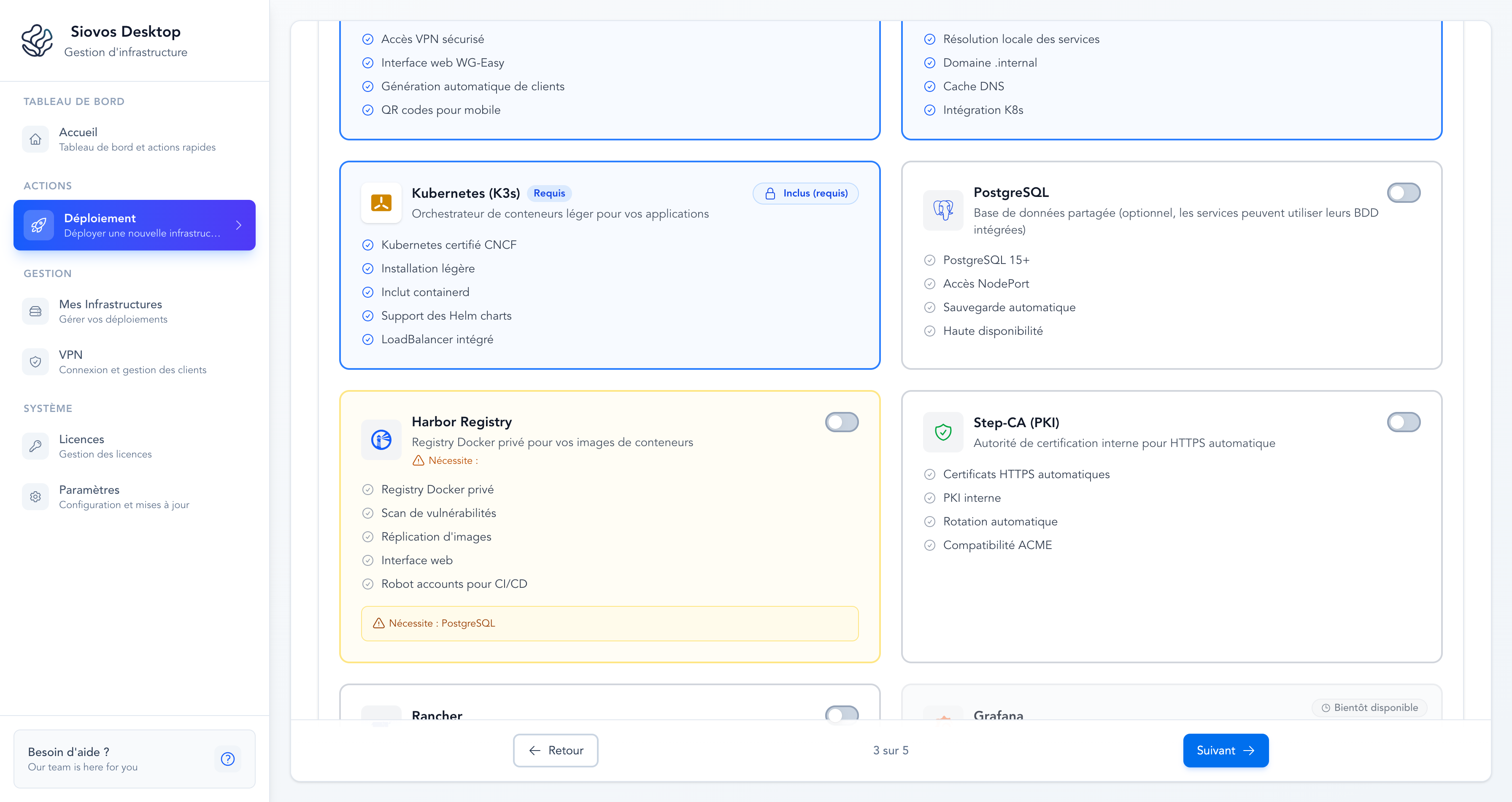
This option is useful if you have specific needs that don't match any profile.